Solutions / Loads, brokers and shippers
Shipper Quotes
Lane pricing for shipper RFQs from your own costs, with every number shown.
The problem
RFQs need miles, deadhead, diesel and margin worked out lane by lane, usually in a spreadsheet at night.
Uses live public data: EIA weekly diesel prices.
What it does
What it does, in plain words.
- Reads RFQ tables from emails or spreadsheets
- Prices each lane from your cost per mile, deadhead and lane history
- Fuel surcharge from the weekly EIA diesel price
- Quote PDF, CSV and a reply email
How it works
From your data to a result you approve.
It takes in
- ■Shipper RFQ: email text, a pasted table or a spreadsheet range
- ■Your cost per mile, MPG, surcharge table and margins
- ■Your past loads (lane history, empty miles, backhauls)
- ■EIA weekly on-highway diesel prices
It does
- 1.Reads each lane: origin, destination, equipment, weight, volume, dates; flags what is missing or what you don't haul
- 2.Loaded miles (demo: straight line × 1.18), empty miles to pickup and after delivery from your history
- 3.Trip cost = cost per mile × miles, plus fuel at this week's regional diesel price
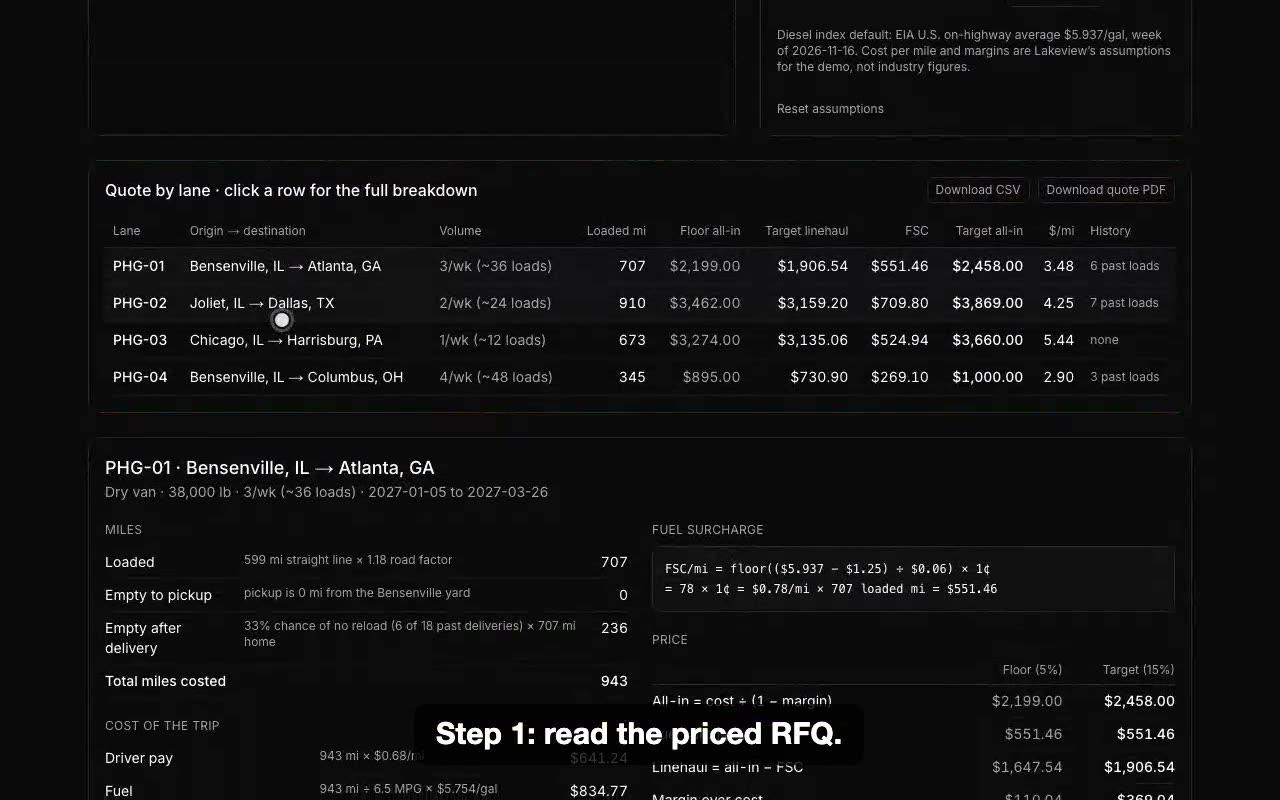
- 4.FSC per mile = floor((diesel index − peg) ÷ increment) × cents per increment, on loaded miles
- 5.All-in = cost ÷ (1 − margin) for floor and target; linehaul = all-in − FSC
- 6.Shows your past loads on similar lanes next to the price, or says there are none
- 7.A person checks and sends; nothing goes out on its own
You get
- ■Floor and target rate per lane with the full breakdown
- ■Quote PDF and CSV
- ■Email draft to the shipper
Real situations
What happens when…
One lane in the RFQ is a reefer (Milwaukee to Memphis, keep at 34F)
Prices the dry van lanes and marks the reefer lane as one Lakeview does not run: decline or pass to a partner.
Result: The email draft lists it under 'Lanes we can't cover' instead of quoting a truck you don't have.
Lanes pasted straight from a spreadsheet, volume in loads per month
Reads the tab-separated columns and converts loads per month to loads per week for each lane.
Result: The same priced table as from an email, with the volume over the contract dates.
The shipper leaves out the weight and the equipment
Prices it as a 53' dry van with a note, and collects every missing field across the lanes.
Result: An email draft that ends with one question listing what the shipper still has to send.
A lane asks for more than 45,000 lb
Prices it but adds a note that it is above Lakeview's weight limit and needs confirming.
Result: The overweight lane is visible before anyone quotes it.
A lane Lakeview has run before
Shows past loads on the same or a similar lane, with their rate per mile, next to the new price.
Result: A quick check of the cost-based price against what the lane actually paid.
Today vs. with the tool
What changes for your team.
| Task | Today | With Shipper Quotes |
|---|---|---|
| Reading the RFQ | Someone retypes lanes from the email or spreadsheet into a pricing sheet. | Lanes are read from the email, table or pasted range, with missing fields listed. |
| Costing each lane | Miles, empty miles and diesel looked up lane by lane, or copied from the last quote. | Every lane costed from your own cost per mile, history and this week's diesel, each number shown. |
| Fuel | Often rolled into the rate at today's price. | Split out as a surcharge from your table, so linehaul does not move with diesel. |
| Sending the quote | The owner or pricing person writes the email. | A drafted email and PDF; the same person checks the rates, edits and sends. |
Try the demo
Try it yourself in three steps.
On Lakeview Freight Lines, demo data.
- Step 1
Read the priced RFQ
Leave 'Contract RFQ, table (4 lanes)' selected and look at 'Quote by lane'.
- Step 2
Open a lane with no history
Click the PHG-03 row (Chicago → Harrisburg) and read the breakdown below the table.
- Step 3
Change your margin
Under 'Margin', change Target from 15 to 20 %. Then try the 'Diesel index' field.
For a pilot
What we need from you.
To start
- ■Your cost per mile from your books: driver pay, truck notes, insurance, maintenance, overhead
- ■Read-only access to your TMS for lane history, empty miles and reloads, or a past-loads export
- ■Your surcharge table, accessorials and minimum charges
- ■Two or three recent RFQs you already answered, to compare our numbers with yours
- ■Who approves rates before they go out; later the reader can work from the pricing inbox
Security and control
- ■Read-only to start: the agent reads RFQs and your past loads. It does not change anything in your TMS.
- ■Nothing goes to a shipper without approval. The PDF, CSV and email draft wait for your pricing person to check and send.
- ■Your cost per mile, floor margin and lane history stay internal. The quote PDF shows only the target price.
- ■Every RFQ read, quote changed and email sent is logged with who approved it during the pilot.
- ■Your data is not used to train AI models. Where pilot data is stored (which region, your cloud account or ours) is agreed up front, under an NDA.
FAQ
Questions about Shipper Quotes
Does it use market rates?
No. It prices from your costs and your own lane history. You can compare with a rate service yourself; the tool does not claim to know the market.
Does it replace my pricing person?
No. It does the arithmetic and the paperwork. A person decides the rate and sends it.
What if a number is wrong?
Every assumption is on the page and editable, and every lane shows its miles, costs and fuel line by line. Lanes with no history say so instead of guessing.
Which systems does it work with?
RFQs from email or spreadsheets, past loads from your TMS via API or export, diesel prices from the EIA.
First 30 days free on one workflow.
Then month to month. No long contract. Pricing on a 15-minute call.