Solutions / Compliance and fleet
IFTA Quarterly
Miles and fuel by state, tax worked out, problems flagged before filing.
The problem
Every quarter someone adds up miles and fuel receipts by hand, and mistakes mean audits.
Uses live public data: IFTA, Inc. quarterly tax rate matrix.
What it does
What it does, in plain words.
- Miles by state from the ELD, gallons from fuel receipts
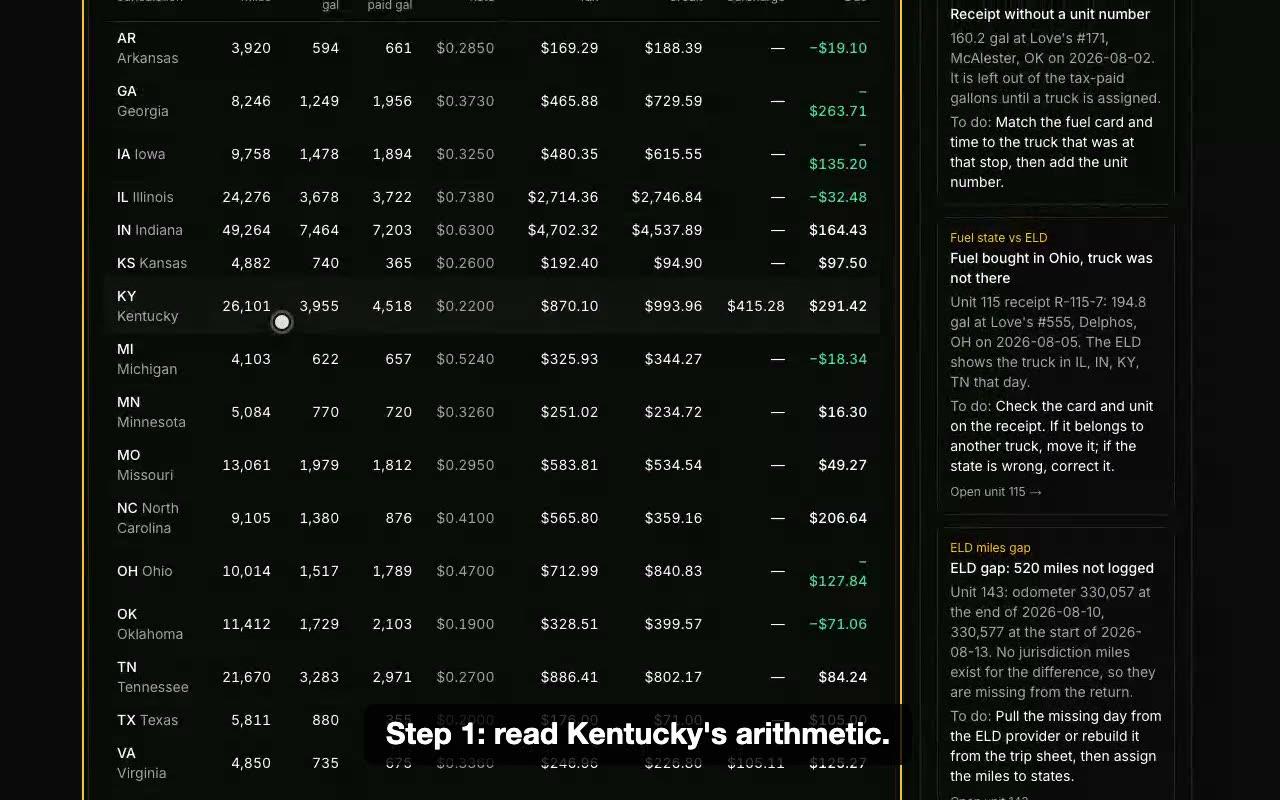
- Tax, credit, surcharge and net per jurisdiction at the official IFTA rates
- Flags missing unit numbers, fuel in states the truck never visited, ELD gaps, odd MPG
- CSV and PDF working paper
How it works
From your data to a result you approve.
It takes in
- ■ELD miles per jurisdiction and daily odometer for every truck in the quarter
- ■Fuel card export and scanned receipts: date, state, gallons, vendor, unit number
- ■The IFTA, Inc. tax rate matrix for the quarter
It does
- 1.Adds up miles and tax-paid gallons per jurisdiction for the whole fleet
- 2.Checks receipts without a unit number, fuel bought in a state the truck was not in that day, odometer jumps between ELD days and units outside 4–9 MPG
- 3.Fleet MPG = total miles ÷ tax-paid gallons; taxable gallons per state = miles ÷ fleet MPG
- 4.Tax = taxable gallons × rate; credit = gallons bought there × rate
- 5.Adds surcharges (Kentucky, Virginia) on taxable gallons, with no credit for fuel bought there
- 6.Nothing is corrected automatically: each flag says what to fix and a person fixes it
You get
- ■Return table by jurisdiction with the arithmetic for each line
- ■A list of quality checks, each with what to do
- ■CSV and PDF working paper for review before filing through the base state
Real situations
What happens when…
A driver left the unit number blank at the pump (truck 122)
Keeps the receipt out of tax-paid gallons and lists it under quality checks with the date, vendor and gallons.
Result: No credit is claimed for fuel nobody can tie to a truck, and a clear note on how to match it.
A receipt says Ohio, but the ELD has unit 115 somewhere else that day
Compares each receipt's state with the states the truck drove on that date and flags the mismatch.
Result: The receipt to check for a wrong card or wrong state before an auditor asks about it.
One truck's receipts work out to 3.74 MPG (unit 178)
Checks every unit against the 4 to 9 MPG range and lists the miles and gallons behind the number.
Result: A pointer to look for another truck's receipts, reefer fuel or missing ELD miles on that unit.
Trucks run through Virginia, which adds a surcharge
Charges the surcharge on taxable gallons with no credit for fuel bought there, on its own line.
Result: Tax, credit and surcharge shown separately, so the Virginia line is easy to check.
Your trucks bought more fuel in a state than they burned there
Credit for the gallons bought there is larger than the tax on the miles driven, so the line goes negative.
Result: A credit on that jurisdiction's line, netted against what is owed elsewhere.
Today vs. with the tool
What changes for your team.
| Task | Today | With IFTA Quarterly |
|---|---|---|
| Collecting the quarter | Someone exports ELD miles and fuel card data and pastes them into a spreadsheet. | The agent pulls both for every truck and lines them up by unit and day. |
| Finding bad data | Mistakes show up when the totals look odd, or during an audit. | Receipts without a unit, fuel in the wrong state, ELD gaps and odd MPG are listed first, before any tax is worked out. |
| Doing the arithmetic | Formulas in a spreadsheet that someone built years ago. | Fleet MPG, taxable gallons, tax, credit and surcharge per state, each line shown. |
| Filing | The office manager or an accountant files through the base state. | Same person files, from a PDF working paper they can check line by line. |
Try the demo
Try it yourself in three steps.
On Lakeview Freight Lines, demo data.
- Step 1
Read Kentucky's arithmetic
In 'By jurisdiction', Kentucky is already selected; read the box under the table, then click VA Virginia.
- Step 2
Open the ELD gap
In 'Quality checks before filing · 4', find 'ELD gap: 520 miles not logged' and click 'Open unit 143 →'.
- Step 3
Download the working paper
At the top of the console, click 'Download PDF working paper' (or 'Download CSV').
For a pilot
What we need from you.
To start
- ■Read-only access to your ELD's IFTA or jurisdiction-mileage export, or one past quarter as a file
- ■Your fuel card export and receipt scans for the same quarter
- ■Your own thresholds: MPG range per truck type, tax-paid bulk tanks, toll-road miles
- ■Someone who files your IFTA today reviews our working paper against the return they filed
- ■Start with one closed quarter; then flags go to the person who can fix them during the next quarter
Security and control
- ■Read-only to start: the agent reads your ELD mileage export and fuel card file. It does not change them.
- ■Nothing is filed with your base state by the tool. The working paper goes to the person who files today, who reviews the flags and files.
- ■Nothing is corrected automatically: every flag names the receipt or ELD day and says what a person should fix. Each fix is logged with who made it.
- ■Your data is not used to train AI models. Where pilot data is stored (which region, your cloud account or ours) is agreed up front, under an NDA.
- ■In the demo the CSV and PDF are generated in your browser.
FAQ
Questions about IFTA Quarterly
Is this tax advice or an official return?
No. It is a working paper for review. The return is filed with your base jurisdiction by you or your accountant.
What if a flag is wrong?
Each flag shows the receipt or ELD day behind it, so a person can check it against the source and dismiss it. The rules and thresholds are visible and yours to change.
Which systems does it work with?
ELDs that export miles by jurisdiction (Motive, Samsara and others have APIs) and fuel card exports, via API, file export or email.
Do you handle Canadian provinces?
The rate matrix includes them; the demo leaves them out because Lakeview runs US lanes only. A pilot can include them.
First 30 days free on one workflow.
Then month to month. No long contract. Pricing on a 15-minute call.