Solutions / Compliance and fleet
Compliance & Expirations
Every DOT deadline for drivers and trucks in one register.
The problem
Medical cards, MVRs, inspections and Clearinghouse queries expire in different files and spreadsheets.
Uses live public data: FMCSA company census.
What it does
What it does, in plain words.
- One register with the rule and CFR section behind every deadline
- Reminders to the driver and the manager at 30, 7 and 0 days
- Internal audit-readiness checklist
- Look up your own USDOT record live
How it works
From your data to a result you approve.
It takes in
- ■Driver files: hire date, CDL and medical card dates, last MVR review, last Clearinghouse query
- ■Truck files: last annual inspection, IRP registration
- ■Company paperwork: IFTA, insurance, USDOT record
- ■From your DQ file system, TMS, shop software or a spreadsheet export
It does
- 1.Computes each deadline from the regulation, with the citation (e.g. 49 CFR 391.45, 391.25, 382.701)
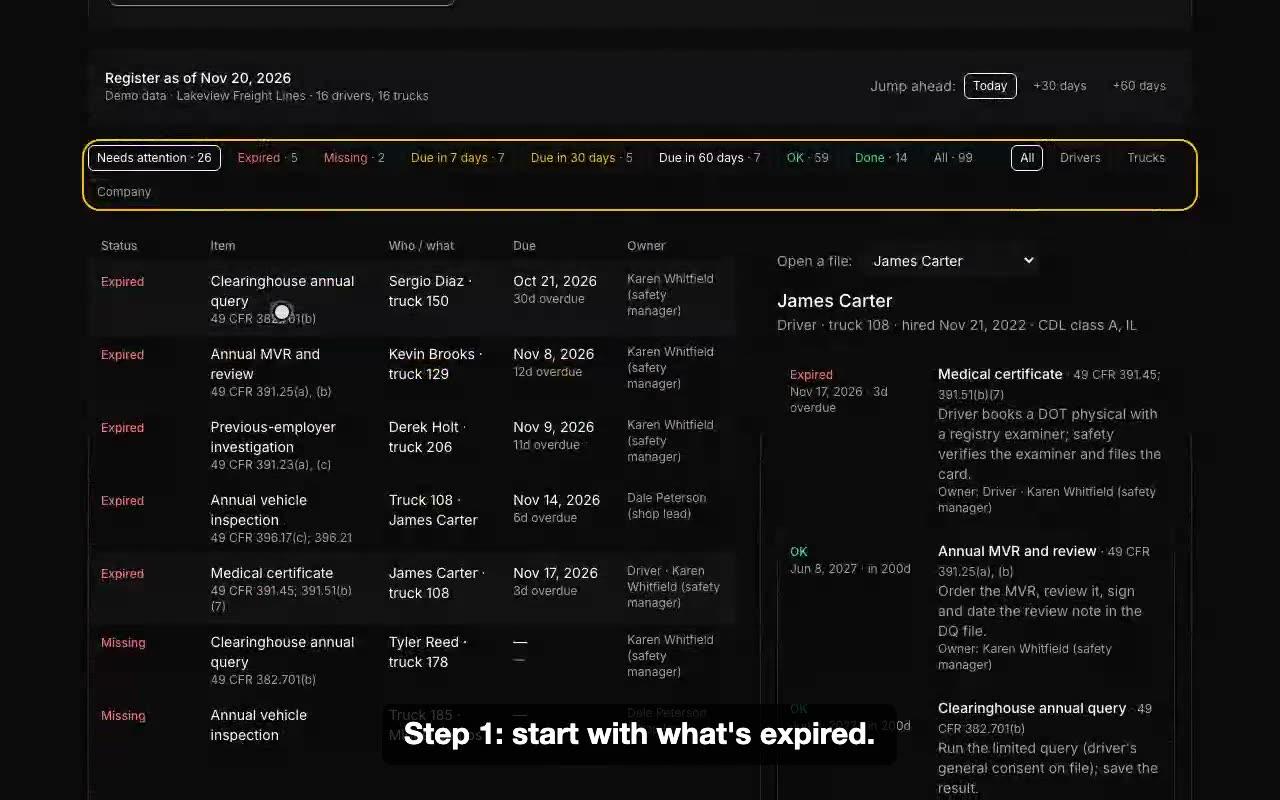
- 2.Ranks items: expired and missing first, then due in 7, 30 and 60 days
- 3.Gives each item an action and an owner (driver, safety, shop or office)
- 4.Drafts reminders to drivers and managers at 30, 7 and 0 days
- 5.Checks DQ file contents as an internal audit checklist
- 6.Nothing is sent or filed automatically; a person approves each reminder and records the new date
You get
- ■One register of every deadline, filterable by status and type
- ■Reminder drafts for approval
- ■Internal audit checklist with the gaps listed
Real situations
What happens when…
A medical card was typed in as good for 36 months (Ryan Walsh)
Caps it at exam date + 24 months, the most 49 CFR 391.45 allows, and tracks that date instead of the one on file.
Result: A due date about a year earlier than the file says, with a note explaining why.
The examiner on a driver's card is not verified on the National Registry (Brian Cole)
Adds a note to the medical item and fails that line of the DQ checklist (49 CFR 391.51(b)(9)).
Result: Safety sees the gap before an auditor does, even though the card itself is still in date.
A driver hired 41 days ago still has an open previous-employer check (Derek Holt)
Counts 30 days from the hire date (49 CFR 391.23) and marks the investigation expired.
Result: An expired item for safety, and the missing safety performance history listed in the audit checklist.
A truck has no annual inspection on file at all (truck 185)
Marks it missing rather than guessing a date, and gives the shop lead the action.
Result: Truck 185 at the top of the list with 'Missing', next to the expired ones.
A CDL expires in 4 days (Sergio Diaz)
Puts it in 'Due in 7 days' and drafts a text to the driver and a note to the safety manager.
Result: Two drafts waiting for approval: what to renew, by when, and who to send the photo to.
Today vs. with the tool
What changes for your team.
| Task | Today | With Compliance & Expirations |
|---|---|---|
| Knowing what is due | Dates sit in DQ folders, the shop binder and a spreadsheet; someone checks them when they remember. | One register, ranked by urgency, rebuilt from your files every day. |
| Working out the date | Whoever files the card types the expiry date, typos included. | Each date is computed from the regulation with the citation shown, and odd dates get a note. |
| Chasing drivers | The safety manager remembers, calls or texts. | Drafts at 30, 7 and 0 days; the safety manager approves and sends. |
| Getting ready for an audit | A week of pulling files when the letter arrives. | An internal checklist of DQ and vehicle file gaps, kept current. Safety still fixes each one. |
Try the demo
Try it yourself in three steps.
On Lakeview Freight Lines, demo data.
- Step 1
Start with what's expired
Above the table, click the 'Expired' chip, then 'Missing'.
- Step 2
Open a driver's file
James Carter is open on the right (or pick anyone from 'Open a file').
- Step 3
Jump ahead 60 days
Next to 'Jump ahead', click '+60 days', then scroll to 'Reminder drafts' and 'Audit readiness'.
For a pilot
What we need from you.
To start
- ■Read-only access or an export of your driver and vehicle dates: DQ file system, TMS, shop software or spreadsheet
- ■Your rules on top of the federal ones: shorter internal deadlines, state inspections, extra documents
- ■Who approves reminders and records new dates (safety, shop, office)
- ■Your USDOT number, so the census record is checked on a schedule
- ■Start by comparing our register with your current list; reminders then go out from your number and email after approval
Security and control
- ■Read-only to start: the agent reads your DQ files, shop records and office paperwork, or an export of them. It does not change them.
- ■Nothing goes to a driver or manager without approval during the pilot. Reminders are drafts; a person sends them and records the new date.
- ■Every approved reminder and every recorded date is logged with who did it. The demo shows the input and output of each file side by side.
- ■Your data is not used to train AI models. Where pilot data is stored (which region, your cloud account or ours) is agreed up front, under an NDA.
- ■The FMCSA lookup uses public census data only, read live from data.transportation.gov.
FAQ
Questions about Compliance & Expirations
Is this legal advice?
No. It is a tracking aid built on the federal rules, with the citation on every line. Your safety manager or attorney still decides.
Does it replace my safety manager?
No. It takes the date-keeping and the reminder writing. People approve every reminder and record every renewal.
What if a date in my files is wrong?
The rule and the input are shown next to each result, so a wrong date is easy to spot. Odd cases like a card longer than 24 months get a note instead of a silent guess.
Which systems does it work with?
Anything that exports driver and truck dates: a DQ file system, TMS, shop software or a spreadsheet, via API, export or email.
First 30 days free on one workflow.
Then month to month. No long contract. Pricing on a 15-minute call.