Solutions / Loads, brokers and shippers
Load Offer Inbox
Every load-offer email read and answered in seconds.
The problem
The inbox fills with offers in every format; the good ones are gone before anyone reads them.
What it does
What it does, in plain words.
- Extracts lane, pickup, weight, equipment and rate, even several loads per email
- Checks your rules and which truck is free
- Suggests accept, counter or decline and drafts the reply
How it works
From your data to a result you approve.
It takes in
- ■Load-offer emails and forwarded load-board alerts, in any format
- ■Free trucks and their positions from the ELD and TMS
- ■Your broker list and the public FMCSA register
It does
- 1.Reads lane, pickup time, equipment, weight, rate, miles and reference from each offer, several loads per email if needed.
- 2.Finds the truck free near the pickup in time and its empty (deadhead) miles.
- 3.Checks your rules: at least $2.10/mi including deadhead, at most 150 empty miles, 44,000 lb, 53' dry van only, pickup 3 to 48 hours out, broker not flagged.
- 4.Accepts good offers, counters low ones at your floor rounded to $25, declines the rest.
- 5.Asks only for what is missing, such as weight or rate.
- 6.Drafts a short reply; a dispatcher approves and sends it.
You get
- ■A decision per load: accept and wait for the rate con, counter, decline or ask for info
- ■A suggested price for counters
- ■A reply draft per email, ready for a dispatcher to send
Real situations
What happens when…
One email, three loads (Prairie Load Solutions: Kansas City, Aurora, Denver)
Splits it into three offers and checks each against the rules and the free trucks on its own.
Result: One reply that answers every load on its own line: take, counter or pass.
A broker sends a lane and a rate but no weight (Blue Ridge, Charlotte to Atlanta)
Marks weight as missing and does not quote until it is known.
Result: A one-line reply asking for the weight, nothing else.
A forwarded load-board alert priced per mile (Summit, Indianapolis to Memphis at $1.85/mi)
Turns the per-mile rate into dollars over the trip miles, adds the empty miles to the pickup and recalculates.
Result: The real rate per mile all in, and a counter at your floor if it falls short.
A load that does not fit the equipment or the weight (a reefer from Detroit, 46,500 lb to Houston)
Fails the dry-van or 44,000 lb check before any price math.
Result: A polite pass that gives the plain reason, so the broker knows what to send next time.
You paste a real offer from your own inbox
Runs it through the same pipeline. A broker not on Lakeview's list is checked against public FMCSA records.
Result: The same decision, rule checks and reply draft as the demo inbox.
Today vs. with the tool
What changes for your team.
| Task | Today | With Load Offer Inbox |
|---|---|---|
| Reading offers | A dispatcher opens each email between calls and copies the lane, weight and rate by hand. | Every offer is read as it lands, in any format, several loads per email. |
| Matching a truck | Dispatch checks the ELD or the board for who is free near the pickup. | The nearest truck that makes the pickup in time and its empty miles are shown per load. |
| Pricing | Rate per mile and the counter are worked out in someone's head or a calculator. | The all-in rate and a counter at your floor are calculated with your numbers. |
| Broker check | Someone remembers which brokers to avoid, or looks them up when there is time. | Your broker list is checked on every offer; unknown MCs are checked against FMCSA. |
| Replying | The dispatcher types each answer. | A short reply is drafted; the dispatcher reads it, edits if needed, and sends it. |
Try the demo
Try it yourself in three steps.
On Lakeview Freight Lines, demo data.
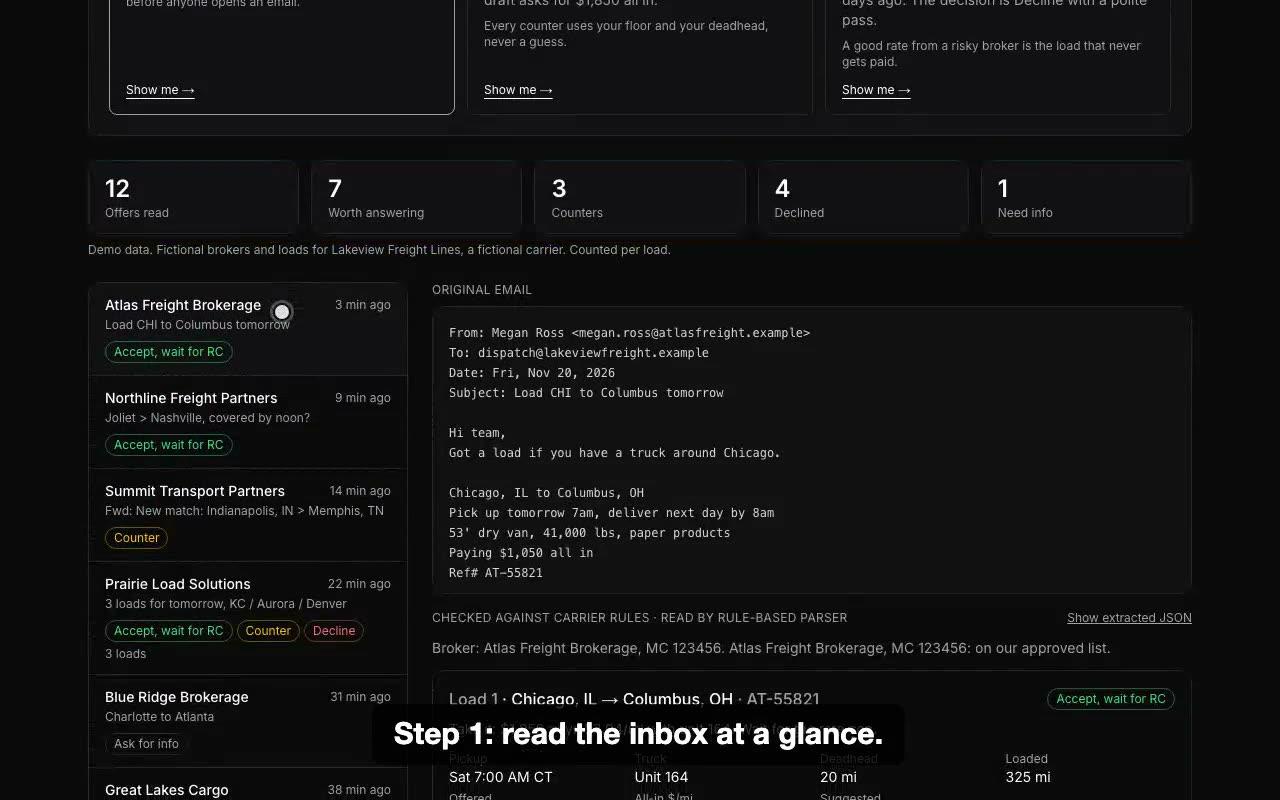
- Step 1
Read the inbox at a glance
Look at the five counters above the inbox.
- Step 2
Open a low offer
In the inbox, click Atlas Freight Brokerage, “Milwaukee to Atlanta”.
- Step 3
See a high-paying load declined
Click Quickhaul Brokers LLC, “URGENT!!! HIGH PAYING LOAD”.
For a pilot
What we need from you.
To start
- ■Read access to your load-offer inbox (Gmail, Outlook or a shared dispatch address) and, if you want, load-board alerts
- ■Read-only truck positions and hours from your ELD and TMS
- ■Your numbers: minimum rate, max deadhead, weights, equipment, lanes you like and avoid, brokers to avoid
- ■A dispatcher who approves each reply; nothing is sent without a person
- ■Start with a week of real offers from your inbox, checked side by side with what dispatch did
Security and control
- ■Read-only access to the offer inbox, ELD and TMS first. The tool cannot book a load or change one.
- ■Nothing goes to a broker without a dispatcher approving it during the pilot. In the demo the reply is only a draft.
- ■Your minimum rate and broker flags stay internal: replies never quote the floor or say a broker is flagged.
- ■In a pilot every offer, rule check and decision is logged. The demo shows the checks behind each decision, so you can see why a load was taken, countered or passed.
- ■Your data is not used to train AI models. Where pilot data is stored (which region, your cloud account or ours) is agreed up front, under an NDA.
FAQ
Questions about Load Offer Inbox
Does it replace my dispatcher?
No. It does the reading and the math on every offer. The dispatcher decides and sends the reply.
What if it reads an offer wrong?
Every rule check is shown next to the email, and anything missing or unclear becomes a question to the broker, not a guess.
Which systems does it work with?
Your offer inbox (Gmail, Outlook or a shared dispatch address), load-board alerts, and your ELD and TMS through their API or an export.
Can it take loads on its own?
Not during a pilot. An accept means “send the rate con”; a person confirms before anything is booked.
First 30 days free on one workflow.
Then month to month. No long contract. Pricing on a 15-minute call.