Solutions / Phones and drivers
Check Calls
The agent calls your drivers so dispatchers don't have to.
The problem
Hours a day go to “where are you, what's your ETA” calls and retyping the answers.
What it does
What it does, in plain words.
- Calls on a schedule: after pickup, in transit, before delivery, when the truck stops too long
- Writes location, ETA and issues into the TMS
- Flags answers that don't match the ELD
- Sends the broker an update automatically
How it works
From your data to a result you approve.
It takes in
- ■Loads, stops and appointments from the TMS
- ■Truck position, speed and stops from the ELD
- ■The driver's answers on a short voice call
It does
- 1.Schedules calls: after pickup, every few hours in transit (never during a 10-hour break), before delivery.
- 2.Adds a call when the ELD shows an unplanned stop or the ETA moves past the appointment; calls close together are merged.
- 3.Calls the driver: location, ETA, anything wrong. About a minute.
- 4.Compares the answer with the ELD and flags location, distance or ETA that do not match.
- 5.Writes only the changed fields to the TMS.
- 6.Drafts the broker update; holds it for a person when the ELD disagrees or the broker is flagged.
- 7.Passes breakdowns, lumper, detention and mismatches to a dispatcher.
You get
- ■Check-call entries in the TMS (location, ETA, issue, status)
- ■Broker update drafts, ready or held for approval
- ■A short list of calls a dispatcher needs to handle
Real situations
What happens when…
A truck sits near the shipper for 3 hours, not at the dock (WC-1045)
The ELD shows an unplanned stop past 45 minutes, so it calls the driver right away instead of waiting for the next routine call. The driver reports an air line leak and a mobile mechanic.
Result: Issue logged as a breakdown, status set to in_transit_issue, and the call is on the dispatcher's short list.
The receiver wants a $175 lumper before unloading (WC-1051)
On the before-delivery call the driver mentions the lumper and the Comchek. It logs the issue and drafts a broker update asking them to confirm reimbursement.
Result: A dispatcher sends the Comchek; the broker already has the request in writing.
Rain and a work zone on I-75, about 40 minutes behind (WC-1049)
The routine in-transit call picks up the delay and the later ETA. A delay alone does not need a dispatcher.
Result: TMS status in_transit_delayed with the new ETA, and a broker update drafted and ready to send.
The load is booked with a broker flagged in your TMS (WC-1053)
The calls run as usual, but every broker update for that load is held instead of drafted as ready.
Result: Nothing goes to a broker you marked for caution until a dispatcher has read it.
You want to hear it as the driver
Pick WC-1042, WC-1048 or WC-1050 and enter your number with a demo code. The agent calls you, asks location, ETA and issues, and records the answer.
Result: Your answer is checked against the simulated ELD. Say you are somewhere else and it gets flagged.
Today vs. with the tool
What changes for your team.
| Task | Today | With Check Calls |
|---|---|---|
| Routine “where are you, what’s your ETA” calls | A dispatcher dials each driver several times per load and waits for an answer. | The agent calls on the schedule above and never during a planned 10-hour break. |
| Logging the answer | Typed into the TMS by hand, when there is time. | Only the changed fields are written: last check call, ELD location, ETA, issue, status. |
| Checking the answer | Someone opens the ELD if something sounds off. | Every answer is compared with the ELD; disagreements are flagged for a dispatcher. |
| Broker updates | Written and sent by the dispatcher after the call. | Drafted after the call. Held for a dispatcher when the ELD disagrees or the broker is flagged. |
| Breakdowns, lumpers, detention | Found when the driver calls in, or buried among routine calls. | Passed straight to a dispatcher, who makes the decision and the money call. |
Try the demo
Try it yourself in three steps.
On Lakeview Freight Lines, demo data.
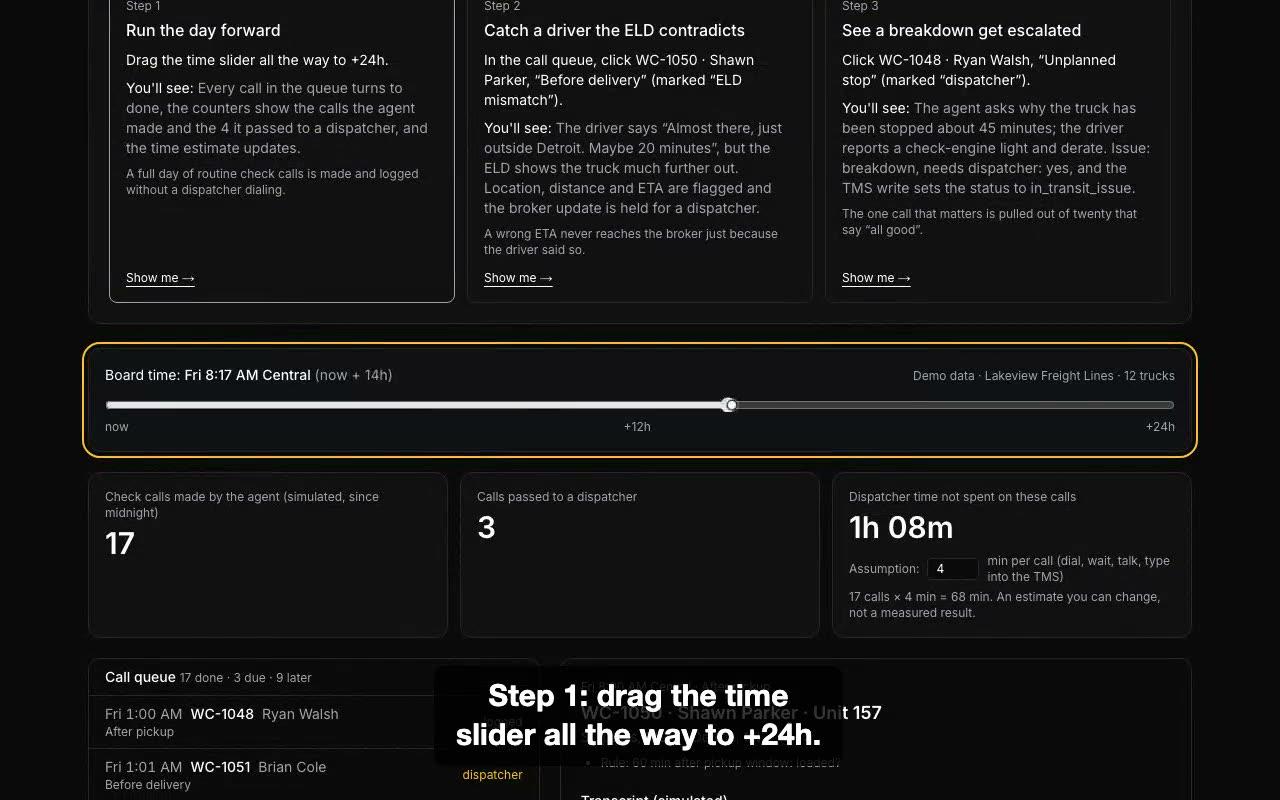
- Step 1
Run the day forward
Drag the time slider all the way to +24h.
- Step 2
Catch a driver the ELD contradicts
In the call queue, click WC-1050 · Shawn Parker, “Before delivery” (marked “ELD mismatch”).
- Step 3
See a breakdown get escalated
Click WC-1048 · Ryan Walsh, “Unplanned stop” (marked “dispatcher”).
For a pilot
What we need from you.
To start
- ■Read-only access to your ELD (Samsara, Motive or others) and your TMS (API or export)
- ■Write access to the TMS check-call fields, or a file we hand back while testing
- ■Your rules: how often to call, quiet hours, which brokers want which updates, who gets flagged issues
- ■Which broker updates go out by email or portal and which wait for a dispatcher
- ■Start with a few trucks and calls from your own number, in English or Spanish
Security and control
- ■The pilot starts with read-only access to your ELD and TMS. Check-call results come back as a file until you are happy to let it write the check-call fields.
- ■No broker update goes out without a dispatcher approving it during the pilot. Updates are drafts, and the demo already holds them on ELD mismatches and flagged brokers.
- ■The agent says it is an automated check call and only asks about the load it is calling for. It cannot change rates, appointments or the load itself.
- ■Every call is logged with its transcript, the fields pulled out, the TMS write and the broker draft. The board shows this for each call.
- ■Your data is not used to train AI models. Where pilot data is stored (which region, your cloud account or ours) is agreed up front, under an NDA.
FAQ
Questions about Check Calls
Does it replace my dispatcher?
No. It makes the routine calls and writes them down. Breakdowns, lumper money, detention and anything the ELD does not back up go to a dispatcher, who decides.
What if the driver says something wrong, or the agent mishears?
The answer is compared with the ELD before anything goes out. A mismatch is a flag, not a verdict: the broker update is held and a dispatcher checks.
Will drivers put up with it?
Calls are about a minute, never during a planned break, and close calls are merged into one. You set how often it calls; start with a few trucks and ask the drivers.
Which ELD and TMS does it work with?
Samsara, Motive and others through their API for positions. Your TMS through its API, an export or email. If there is no API, we start with exports.
First 30 days free on one workflow.
Then month to month. No long contract. Pricing on a 15-minute call.